 26Nov
26Nov

An industrial UPS supplies backup power to defined key loads when the normal supply fails or falls outside the system’s working limits. Choose it by the load, power conditions, site environment, and required backup time, then verify the quoted equipment against those needs.
A plant can have a large power bill but a small, vital control load. Backing up every motor may be a different project from keeping controllers, sensors, and communications running. If those needs are mixed together, an apparently reasonable quotation can describe the wrong system.
This guide turns the industrial UPS selection process into a practical project brief. You will learn which details to collect, how to separate capacity from battery runtime, and what evidence to request before comparing proposals.
Key takeaways
- Define the key load bus before choosing a capacity or UPS topology.
- Check both the UPS output kW limit and its kVA limit; they describe different constraints.
- Treat battery runtime, future growth, and redundancy as separate design questions.
- Match the quoted model to the actual environment, interfaces, and maintenance plan.
- Compare written setups and service terms, rather than unsupported uptime promises.
Planning an industrial UPS inquiry? Review the industrial UPS systems category and prepare your key-load list, supply details, and backup objective before discussing a setup.
1. Define the industrial UPS load and protection boundary
Start with the process that must continue
The first question is what must keep working during a supply interruption. A controller may need power to record a process state, keep a communication link open, or complete a shutdown sequence. A server may need enough time to save data and stop cleanly.
Write down that purpose before listing equipment. It gives the industrial UPS project a clear boundary and helps the operations team explain what an outage response should accomplish. “Keep the factory running” is too broad to serve as a load schedule.
Start with the control loads. Then consider the power that drives the process. A production line can contain controllers, operator screens, network switches, drives, pumps, and large motors. Don’t assume that protecting the control circuit also keeps every connected machine working.
An industrial UPS project brief should name the equipment on its output and the equipment outside that boundary. It should also record any dependency on another power source. A powered controller can’t complete its intended task if another required part of the process has already lost power.
Illustrative scenario: the control cabinet and the conveyor
A facilities team requests backup for a packaging line. Its first equipment list includes the conveyor motors and the control cabinet, but the stated goal is to preserve records and support a controlled stop. Those are different needs.
The team separates the loads and asks which circuits must remain energized during that stop. This doesn’t establish a final capacity or prove that a particular UPS is suitable. It makes the industrial UPS request exact enough for an engineer to check.
Use the same approach when a project spans several electrical rooms. Record which loads belong to each protected bus, who owns the shutdown logic, and what happens when backup energy is exhausted. These answers affect the system proposal more than a general industry label does.
Keep the load schedule separate from the catalog of available UPS systems. A product list helps identify options; it does not replace the site requirements.
Distinguish industrial needs from product labels
“Industrial” describes an use and its demands; it doesn’t name one universal circuit design. Temperature, contaminants, electrical disturbances, load behavior, and service access can differ between sites. The required industrial UPS features must follow those conditions.
AMETEK’s commercial and industrial UPS comparison provides useful evaluation categories, including the environment, bypass layout, battery system, and failure response. It’s a framework for asking questions, not proof that every current model has the same design or lifetime.
For a focused comparison, see Banatton Group’s guide to industrial and commercial UPS needs. Keep the final purchasing decision tied to the actual model and site project brief.
2. Check industrial UPS capacity in both kW and kVA
Build a load schedule that can be reviewed
For each protected item, record its purpose, supply connection, working power, and available power-factor details. Also name startup demand, sudden load changes, and any equipment that operates only during an outage. Mark whether values came from measurement, a nameplate, or a maker document.
Those sources answer different questions. A maximum nameplate value can differ from the normal working load. A short observation may miss a production peak. Explain what was measured and under which working state, rather than presenting one number without context.
| Load-schedule field | What to record | Why it helps |
|---|---|---|
| Equipment and function | Device, location, and key task | Defines the protection boundary |
| Continuous demand | W or kW, VA or kVA, and load state | Supports steady-load checks |
| Power factor | Measured or written value and conditions | Supports the kW/kVA comparison |
| Startup or load step | Available curve or maker data | Identifies a separate transient check |
| Supply setup | Voltage, frequency, and phase layout | Checks electrical compatibility |
| Backup objective | Required task and duration | Defines the battery study |
A good industrial UPS load schedule is a working document. Operations, electrical engineering, and buying should review the same version. If a machine is added after the quotation, record the change and request a revised review.
Separate real power from apparent power
Keep both numbers. They answer different questions.
Real power is expressed in watts or kilowatts. Apparent power is expressed in volt-amperes or kilovolt-amperes. For a stated load power factor, apparent power equals real power divided by that power factor.
The Eaton UPS sizing guide explains the conversion and treats capacity, runtime, growth, and redundancy separately. Its growth examples belong to that guide; a project should choose its own written allowance.
The industrial UPS must satisfy both output limits. A kVA rating alone doesn’t tell you the available output kW. Also, the load’s power factor is a different quantity from a published UPS input-power-factor value.
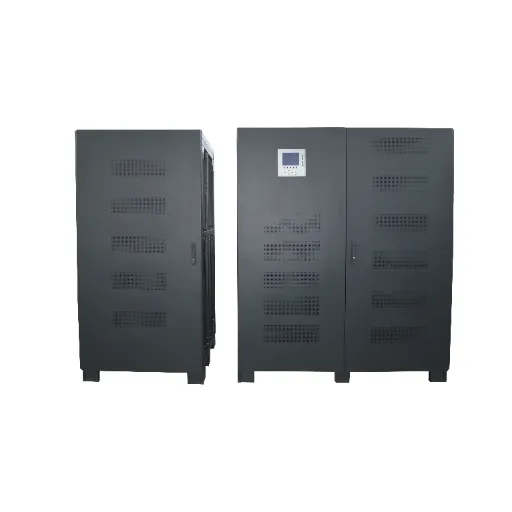
Banatton’s published 100kVA UPS setup guide lists the BT9100H-33 as 100kVA/90kW, with an output power factor of 0.9. It separately lists input power factor of at least 0.99 at full load. Confirm the current model data sheet; the input figure doesn’t change the listed output kW limit.
Illustrative scenario: a load that needs two checks
Assume a key load is 72kW at a load power factor of 0.90. Its apparent power is 80kVA: 72 divided by 0.90. These figures are an illustrative calculation, not measurements from a Banatton customer.
If the project tests a 20% growth scenario, the two values become 86.4kW and 96kVA. This scenario doesn’t make a 100kVA unit an automatic recommendation. The quoted model still needs checks for load changes, working conditions, and all applicable limits.
The lesson is to preserve both columns through the quotation process. An industrial UPS proposal that passes the apparent-power check can still fail another need. Ask the supplier to show how the complete load schedule fits the quoted setup.
Check growth and short-duration demand separately
Future growth is a planning assumption. Startup demand and sudden load steps describe how equipment behaves. Adding a general percentage to the steady load doesn’t prove that the industrial UPS can support those events.
Request the model’s overload capability and the relevant conditions. Ask the engineer to compare the data with the load. The check must use the quoted mode. Don’t infer motor-start suitability from the word “industrial” or from a larger capacity alone.
For future additions, list the expected devices and when they may arrive. This makes an expansion plan easier to assess than a vague instruction to leave room for growth. Keep uncertainty visible so the industrial UPS proposal can be revised when the plan becomes clearer.
3. Choose topology, phase setup, and isolation separately
Understand the normal power path
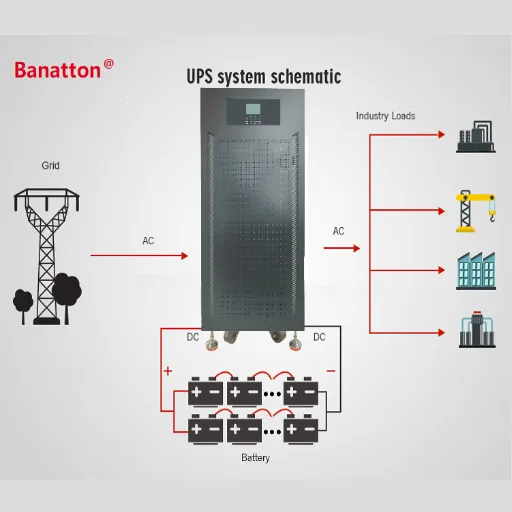
UPS topology describes how power reaches the load during normal operation and disturbances. In online double conversion, incoming AC power is converted to DC and then back to AC through the inverter. Battery support and bypass operation must be understood within the particular system design.
Ask for a simple power-path drawing for the quoted industrial UPS. It should distinguish normal operation, battery operation, and bypass. A feature described for one path should not be assumed to apply unchanged in every mode.
For example, a statement about the inverter’s output doesn’t explain what happens when the load is supplied through bypass. Ask which conditions trigger a transfer, what the load sees, and what source remains available. Keep those answers tied to the maker documents.
Compare high-frequency and low-frequency designs by evidence
The industrial UPS label doesn’t settle the choice between high-frequency and low-frequency equipment. Compare the actual circuit layout, transformer setup, overload data, efficiency conditions, and installation needs. These details are more useful than a broad claim that one design is always better.
Banatton’s low-frequency and high-frequency UPS comparison provides a separate place to explore those trade-offs. In the project project brief, request the data needed to test the quoted design against your load.
Avoid comparing an efficiency figure from one working mode with another figure measured under different conditions. Record the load level and mode beside each value. State which parts of the system it includes. This keeps the industrial UPS comparison consistent when proposals use different terminology.
Confirm input and output phase layouts
Record whether the protected loads require AC or DC power. This guide addresses AC UPS selection; a DC UPS request needs a separate check of its supply, output, battery, and load requirements. Do not mix the AC/DC choice with the input and output phase choice.
Input phase setup and output phase setup are separate project briefs. A site’s supply layout, the protected loads, and the quoted unit must be compatible. “Three-phase UPS” isn’t enough detail for a complete inquiry.
Record input voltage and frequency, output needs, and how loads connect across the output. Ask about phase imbalance limits and any conditions that change the permitted load. A qualified electrical designer should review the installation details.
An industrial UPS quotation should state the setup directly, including any neutral need. Leave no uncertainty about whether the proposal matches the load schedule. This is a selection guide, not a replacement for the model’s wiring and installation instructions.
For a product-level reference, the three-phase online UPS listing identifies an existing range to review. Confirm the selected version and its site limits before using that listing as a purchasing specification.
Evaluate isolation by purpose and location
An isolation transformer is a design component with a defined purpose and position. Ask whether it is on the input, output, or another path, and which parts of the system it isolates. Don’t treat conversion topology and galvanic isolation as interchangeable terms.
The industrial UPS project brief should name the problem the quoted transformer addresses. It should also document the effects on the system layout, space, and losses. Grounding, neutral, and protection decisions belong with the responsible electrical engineer.
Don’t assume an ordinary isolation transformer automatically regulates voltage or prevents every disturbance. Equally, don’t write “all industrial systems require a transformer” without identifying the applicable design needs. The useful question is whether the quoted layout meets this project’s written needs.
4. Define battery runtime and compatibility from clear conditions
State what must happen during an outage
Battery runtime is the time the system must support a specified load under stated conditions. It may be intended to bridge a generator start, complete a controlled shutdown, or maintain a service for a defined outage period. Describe the required task as well as the duration.
The industrial UPS battery study should use the protected load, not an unrelated equipment rating. If the shutdown sequence changes the load over time, record that pattern. A single steady-load value may not describe the intended outage response.
Keep capacity and backup time separate. More output capacity doesn’t, by itself, establish more stored energy or a longer backup period. Compare the quoted battery layout and its supporting data.
Request the evidence behind the runtime figure
Ask for the battery model, setup, discharge data, and calculation conditions. The supplier should name the supported load, cutoff condition, temperature basis, and allowance for battery aging. The result needs to describe the same industrial UPS layout being quoted.
Don’t use a competitor’s runtime chart to support a Banatton battery setup. Even a familiar battery capacity label isn’t a complete calculation. The system, battery characteristics, and working conditions must match the review.
A simple energy divided by load calculation can explain an idealized relationship, but it isn’t a reliable runtime guarantee. Use a model-exact calculation or chart that includes the required conditions. If those data are missing, the industrial UPS proposal has an open evidence item.
| Runtime-study input | Project details needed |
|---|---|
| Protected load | Demand and working state during the outage |
| Required result | Bridge, shutdown, or continued operation |
| Battery layout | Model, setup, and supported UPS version |
| Site conditions | Temperature and other relevant working constraints |
| Lifecycle basis | Required performance at the stated battery age |
| Calculation evidence | Matching discharge data and maker review |
Check battery chemistry as a system choice
Lead-acid and lithium-ion describe different battery families, not a universal upgrade path. Before changing chemistry, confirm the UPS voltage needs, charging behavior, protection, and communication layouts. Compatibility must be established for the quoted combination.
A solar-storage battery should not be assumed suitable for an industrial UPS because both systems use batteries. Ask the supplier for the supported battery setup and its limits. The relevant question is whether this battery and this UPS work together under the required conditions.
Evaluate the whole ownership plan: battery purchase, replacement, handling, service access, and disposal layouts. Use actual quotations and written needs. A comparison without those inputs should describe cost categories rather than promise a saving or payback period.
Keep design life and working evidence separate
Battery design life, warranty, and runtime are different statements. Ask how each one is defined and under which conditions it applies. A design-life label doesn’t prove the backup time available at every point in service.
Record how the industrial UPS battery system will be inspected and assessed over time. The project should have a process for reviewing condition and replacing equipment when required by the maker and site plan. Avoid a fixed replacement interval borrowed from a different battery or use.
Ready to compare setups? Send the load schedule and backup-time objective through the Banatton technical inquiry page. Ask for the quoted battery layout and the conditions behind its runtime review.
5. Separate modular growth from system redundancy
Identify the capacity available after a defined failure
Modular expansion concerns adding capacity. Redundancy concerns the capacity and functions that remain after a specified loss. A system can offer expansion without providing the required redundancy at its current load.
For an industrial UPS using multiple power modules, ask what load can be supported with one module unavailable. Also ask what remains shared: the frame, controls, bypass, battery system, and other paths. Module redundancy doesn’t remove every possible system failure.
The proposal should describe its failure assumptions in plain language. “N+1” is useful only when the meaning of N, the module rating, the load, and the working conditions are clear. Request a drawing alongside the capacity calculation.
Define the maintenance power path
Check the whole path. A spare module is only part of the answer.
Ask how the load is supported during planned work. A maintenance bypass can change which source feeds the load and which protections remain active. The intended work procedure must match the installed equipment and site rules.
Don’t equate a replaceable module with permission for every maintenance action under load. The industrial UPS manual should define the allowed tasks and conditions. Qualified service personnel should plan work on power paths and stored-energy systems.
A practical proposal names access space, replacement parts, and service layouts before installation. Those items affect whether the planned setup can be maintained as intended. They should be checked alongside expansion and redundancy.
6. Match the site, buying evidence, and service plan
Check the real environment at the equipment location
Record temperature, humidity, contaminants, ventilation, and access at the quoted UPS and battery locations. A description of the wider plant doesn’t establish the conditions inside the equipment room. Include expected extremes and any known changes during an outage.
The Falcon guide to UPS selection for industrial environments highlights the need to compare environmental conditions with equipment ratings. Use that principle for the exact industrial UPS model, rather than borrowing another maker’s wide-temperature capability.
Banatton’s published BT9100H-33 guide lists an working temperature of 0–40°C. That range belongs to the model details, not to every industrial UPS offered for every use. Ask for current limits and any required derating before accepting the proposal.
Also confirm where the battery will operate. The UPS cabinet and the battery installation may have different needs. A site review should make those conditions visible before performance figures are compared.
Specify interfaces and installation responsibilities
List the required input and output connections, bypass source, alarm signals, and monitoring interfaces. Explain which existing system will receive status details and who will test the connection. A protocol name alone doesn’t define the integration work.
The industrial UPS proposal should also name installation responsibilities. Confirm the scope for cables, protection, ventilation, access, commissioning, and site testing. These items should be reviewed by the parties responsible for the electrical design and installation.
Keep certificates and technical standards tied to the supplied model and project needs. Request the relevant documents and check their scope. A company management-system certificate isn’t a substitute for every required product or installation document.
Resolve open load items before comparing prices
Give each open item an owner and a due date. If the motor-start curve is missing, ask who can obtain it. If the process load changes during shutdown, ask the operations team to describe that sequence.
Use a clear status such as confirmed, assumed, or awaiting data. This keeps an industrial UPS quote from looking more certain than its inputs. A supplier can price a stated assumption, but the team still needs to check it before buying.
Do the same after a site change. A new controller or a revised stop sequence may change the load list. Keep the quote and the project brief aligned so every party is checking the same task.
Illustrative scenario: an expansion changes the buying brief
Assume three modules are each rated at 30kW for the stated conditions. Their combined nominal capacity is 90kW, but only 60kW remains when one module is unavailable. This is a assumed capacity example, not a Banatton setup recommendation.
If a team increases the protected load beyond that remaining capacity, the original one-module-loss objective no longer holds. The industrial UPS expansion plan must therefore check the intended failure state, not just the sum of installed module ratings.
This is why future load changes deserve a formal review. Adding equipment can affect the battery objective, bypass demand, and maintenance plan as well as steady capacity. Keep those needs together in the industrial UPS change record.
A listed low-frequency industrial UPS product can be a starting point for requesting model documents. Its presence in the catalog does not show that it meets every load or site condition.
Compare proposals on the same basis
A lower quotation may reflect a different battery layout, working assumption, or service scope. Ask each supplier to complete the same need sheet. Then compare deviations and evidence before comparing totals.
For the industrial UPS itself, name the exact model and setup. For the battery system, record the stated runtime conditions. For the project scope, separate equipment supply, installation, testing, training, and ongoing service.
| Procurement item | Evidence or clarification to request |
|---|---|
| Model and setup | Current data sheet and setup description |
| Load support | kW/kVA checks and relevant overload review |
| Battery autonomy | Model-exact calculation and stated conditions |
| System paths | Normal, battery, bypass, and defined failure states |
| Environment | Limits, derating, and installation needs |
| Acceptance | Agreed test scope, records, and responsibilities |
| Service | Warranty terms, parts, maintenance, and response scope |
This sheet helps an industrial UPS buyer distinguish a written answer from a marketing statement. An unanswered item doesn’t need an invented value. Keep it open until the responsible party supplies evidence or agrees a clear condition.
Agree acceptance and lifecycle records
Define what will be checked before shipment and at the site. The test plan should name the setup, conditions, acceptance criteria, and responsible parties. Request records that can be compared with the agreed project brief.
After commissioning, keep the industrial UPS model details, settings, battery details, and baseline records together. Record changes to the protected load or system layout. This gives the next service review a useful starting point.
For ownership cost, collect actual equipment and service prices. Include installation, batteries, planned maintenance, replacement, and any written working assumptions. Without those inputs, use a cost worksheet instead of a promised return on investment.
Use deployment examples within their evidence limits
Banatton’s published Algeria cement-plant case describes a high-frequency 80kVA deployment in July 2016. It’s an example of an industrial use using a particular design, not proof that the same setup fits another plant. The example does not establish the backup time for another plant.
Its Haiti telecom case describes a 200kVA transformer-free modular frame deployed in November 2019. The published description can inform questions about architecture and service needs. It doesn’t establish an independently measured uptime or a guaranteed financial outcome.
An industrial UPS case is most useful when its conditions are clear. Ask which loads, environment, battery setup, and acceptance needs resemble your project. A shared industry name alone isn’t enough to transfer the result.
7. Frequently asked questions
Does an industrial UPS always need a low-frequency design?
No single frequency label establishes suitability for every industrial project. Compare the load, environment, power-path layout, and the model’s written capabilities. Keep transformer setup and working conditions explicit in the industrial UPS review.
Is a 100kVA UPS the same as a 100kW UPS?
No. kVA and kW describe different power quantities, and the model has separate output limits. Banatton’s published BT9100H-33 example lists 100kVA/90kW; that project brief must not be generalized to every 100kVA unit.
How much battery backup time should I request?
Define the task that must finish or continue during the outage, then specify the load and required duration. Ask for battery evidence under the stated temperature and lifecycle conditions. There is no universal runtime that applies to every industrial UPS installation.
Does N+1 protect against every possible failure?
No. It describes a defined redundancy layout, not the absence of all shared failure paths. Check the remaining capacity after the intended loss and review the controls, bypass, batteries, and other common parts of the industrial UPS system.
Can I replace lead-acid batteries with lithium batteries?
Only use a combination supported for the quoted UPS setup. Voltage, charging, protection, and communication needs need to match. A general statement about battery chemistry isn’t evidence that a particular replacement is compatible.
What details makes a technical inquiry useful?
Provide a key-load schedule, input and output needs, backup objective, site conditions, and planned growth. Add your required failure and maintenance states, plus any product-document or acceptance needs. These inputs let suppliers explain a setup on a common basis.
Make the next decision from a complete project brief
Choose an industrial UPS by turning the process objective into written load, battery, environment, and system needs. Check the evidence behind each quoted setup and keep assumptions visible when details are still open.
To discuss a Banatton setup, submit your UPS project brief needs, including the protected load and backup-time target. A clear industrial UPS inquiry is the starting point for a proposal that can be reviewed against the needs of your site.